[x]

deviantART


©2005-2009 ~dotzero
Details
Submitted: March 19, 2005
File Size: 90.5 KB
Image Size: 48.8 KB
Resolution: 248×130
Comments: 11
Favourites & Collections: 32 [who?]

Views
Total: 31,529
Today: 4

Downloads
Total: 14,288
Today: 0

Embed


Thumb

Artist's Comments

Set Version: 1.0

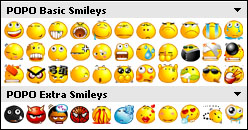
Based on: POPO Emotions by Rokey [link]

---
Installation:
1. Paste the 'POPO' folder to C:\Program Files\Trillian\stixe\plugins folder
2. Go to your Trillian Preferences window
2.1 Skins >> Advanced
2.2 Pick "POPO Emoticons" from the drop down box labelled 'Emoticons:'
3. Restart Trillian.
[x]

Devious Comments

love 0 0 joy 0 0 wow 1 1 mad 0 0 sad 0 0 fear 0 0 neutral 0 0

Comments


Right on man, good work :) I'll let you know if i find bugs

--
//Exposure.
HI, great emot pack, one of the ebst ones i've seen actually, one thing though cool you please add the other emots from the original pack , because there are a lot missing for example the kissing one (K) you could also add the estandard msn ones for stuff like brb pizza bat dog etc, its really anoying when someone using msn tries using an emot and you can't see it

keep it up man ;-)

--
The Dragon Warrior Fights Further without Fear or Regret.
Red Hot blood, Raging with Energy.

The Man with no regrets : Ryoma Nagare
My deleted wallpapers
[link]
hey I love these emoticons! But where's the tongue one :P?
Great choice in emoticon transfer, thank you

--
~Gotta Go :sprint:
Max-MentalSplatter
i followed all of your direction and i still can not pull up these emotes under the preferences menu... i am using trillian 3.0. do i need a certain plugin to use these?
hehe.. i like your sig....

and nice emoticons dotzero!

--
Pink Octopus Lover!
hey i just downloaded this and tried to use it, followed all the directions but for some reason i still cannot use them. its not even showing up as i have them..i was just wondering what else i could do? im using 3.1 basic trillian

Site Map